In a modern marketplace, not every listing should look the same.
A doctor profile, a product listing, and a service offering all serve different purposes—and each requires a different layout to present information effectively.
That’s why Tradly provides Listing Card Customization, allowing you to design how your listings appear based on your marketplace needs.
 Default Layouts (Quick Setup)
If you just want something ready, there are a few built-in options:
-
List view – simple top-to-bottom layout (image, title, price, etc.)
-
Flex (left/right image) – image on one side, details on the other
-
Table view – more compact, focused on price/info
These are good to get started quickly, but honestly—they’re a bit limiting if you want something unique.
Custom Listing Card (This is where it gets interesting)
If you switch to Custom Listing Card, you can design the layout however you want using blocks.
Think of it like building sections:
-
Row → structure
-
Block → content inside the row
You can fully control what shows and where.
What You Can Add
You can mix and match different blocks depending on your use case:
Basic info
-
Title
-
Description
-
Category
Account-related
-
Account image
-
Account name
-
Owner name
Pricing
-
Price
-
Offer price
-
Shipping
-
Stock
Extras
-
Attributes (very useful for custom data)
-
Rating
-
Wishlist button
Media
-
Thumbnail image
-
Raw image
-
Image/video
Actions
-
Add to cart / Buy
-
Custom CTA (like “Book a slot”)
 Why This Actually Matters
This is the part most people overlook.
This feature is not just about design—it’s about matching your business type.
For example:
-
A doctor listing → needs profile + “Book a slot”
-
A product listing → needs price + cart button
-
A service listing → needs attributes + description
-
A digital product → needs media + download-focused CTA
If all of these use the same card layout, the experience breaks.
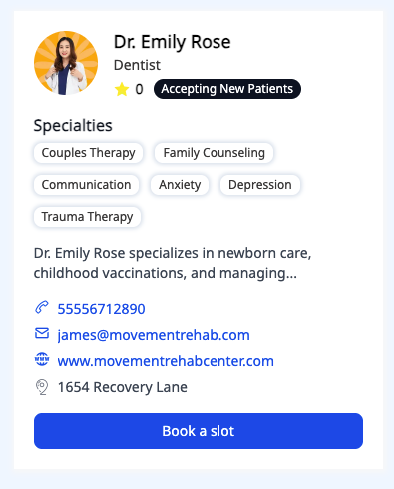
Example 1: Service / Doctor Listing
This type of listing focuses more on trust and action, not price.
-
Profile image + name + availability
-
Specialties (as attributes)
-
Short description
-
Contact details
-
CTA → Book a slot
 Best for:
-
Doctors
-
Consultants
-
Therapists
-
Any appointment-based services
Key idea: Push users toward booking, not browsing.
-
Row 1 → Image + Name + Rating
-
Row 2 → Specialties (attributes)
-
Row 3 → Short description
-
Row 4 → Contact info
-
Row 5 → “Book a slot” button
Example 2: Experience / Content-Based Listing
Here the focus is visual storytelling.
-
Full-width image
-
Overlay title (clean and minimal)
-
Less clutter, more visual impact
Best for:
-
Yoga classes
-
Workshops
-
Travel experiences
-
Courses
Key idea: Sell the feeling, not the details.

Example 3: Product / Rental Listing
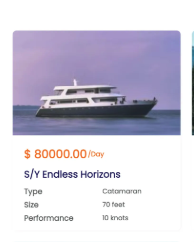
This layout is more data-driven and transactional.
-
Image on top
-
Price highlighted clearly
-
Key attributes (type, size, performance)
-
Structured information
Best for:
-
Rentals (boats, cars, equipment)
-
Physical products
-
Inventory-based listings
Key idea: Help users compare and decide fast.
 Want to Try It?
If you’re wondering where to set this up, you can do it directly from the Tradly Editor.
Go to https://tradly.app/editor
Then:
-
Navigate to Style
-
Open Listing Card
-
Switch to Custom Listing Card
-
Start building your layout using rows and blocks
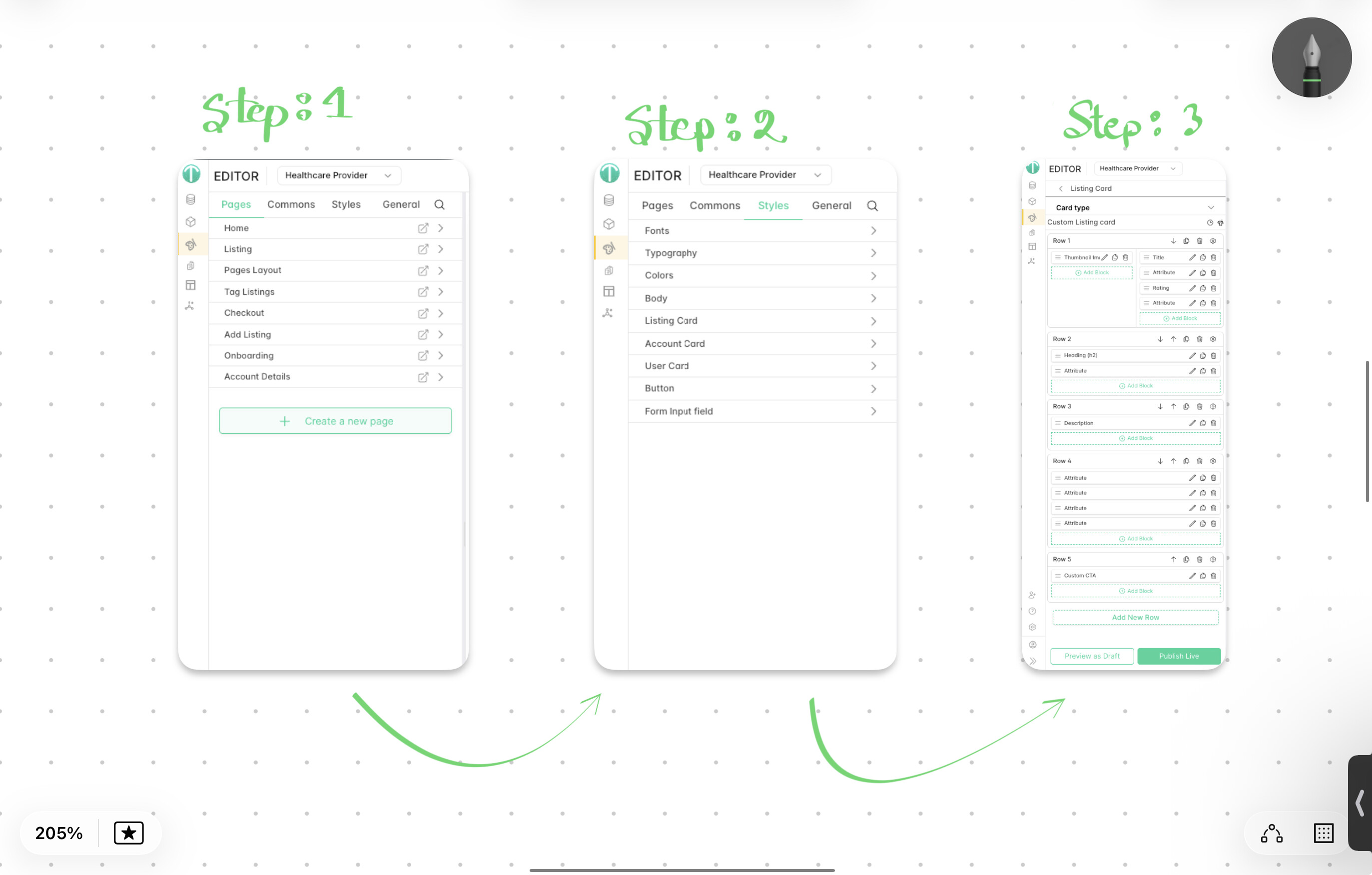
You can preview changes instantly and adjust based on your marketplace needs.
Final Thought
Most platforms force you into one layout. Here, you can actually shape the listing based on how your marketplace works.
And once you start using it properly, you’ll realize—it’s less about “custom UI” and more about building the right experience for your users.